Motion Bus Interface (X10/X11)
|
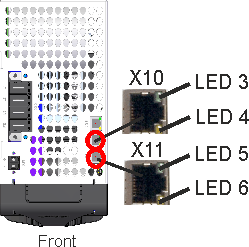
The motion bus interface has RJ45 connectors and can be used for communication with the EtherCAT master and other MKD-C. |
|
|
Do not connect the Ethernet line for the PC or PAC via WorkBench to the motion bus interface X10/X11. The setup Ethernet cable must be connected to X18. |

The communication status is indicated by the built-in connector LEDs.
|
Connector |
LED# |
Name |
Function |
|---|---|---|---|
|
X10
|
LED3 |
Link |
ON = active, OFF= not active |
|
LED4 |
- |
- |
|
|
X11
|
LED5 |
Link |
ON = active, OFF = not active |
|
LED6 |
- |
- |
Pinout
|
Pin |
Signal X10 |
Signal X11 |
|---|---|---|
|
1 |
Transmit + |
Receive+ |
|
2 |
Transmit - |
Receive- |
|
3 |
Receive+ |
Transmit + |
|
4, 5 |
n.c. |
n.c. |
|
6 |
Receive- |
Transmit - |
|
7, 8 |
n.c. |
n.c. |
EtherCAT
MKD-C can be connected as slaves to the EtherCAT network (CoE) via RJ45 connectors X10 (in port) and X11 (out port).


